> ## Documentation Index
> Fetch the complete documentation index at: https://docs.olly.new/llms.txt
> Use this file to discover all available pages before exploring further.
# Organization Management
The **Organization** page covers general organization settings in Olly. From here, admins can manage organization details, control access through verified domains, and handle organization-level actions.
## Verified domains and access control
Admins can add verified email domains to control how users join the organization.
### Add a verified domain
1. Go to **Organization → General**.
2. Under **Verified domains**, select **+ Add domain**.
3. Enter the domain.
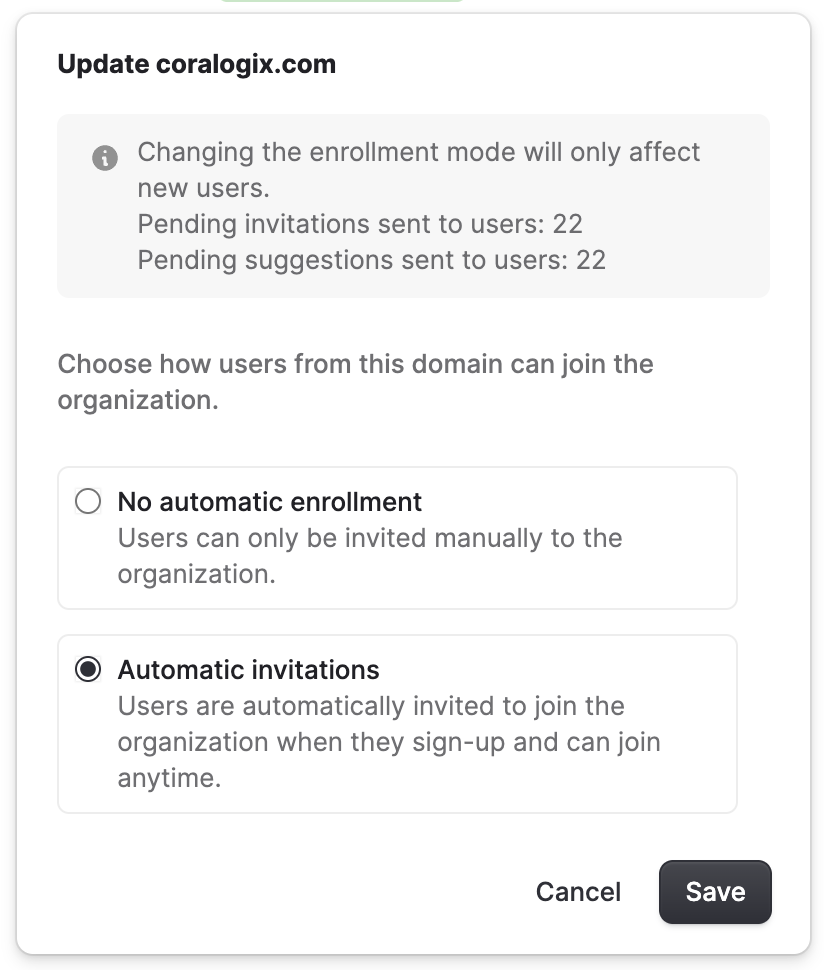
4. Choose how users from this domain can join the organization. Olly supports two enrollment modes for verified domains:
* **Automatic invitations**:
* Any user with a matching email domain (for example, `@coralogix.com`) can join automatically.
* No manual admin approval is required.
* **No automatic enrollment**:
* The domain acts as a recommendation rather than automatic access.
* Users may request to join and require admin approval.
Admins can update or remove verified domains at any time. To update the existing domain, select **… → Manage**.
 ## Leave or delete an organization
From **Organization → General**, users can also manage their relationship with the organization:
* **Leave organization:** Allows a user to remove themselves from the organization.
* **Delete organization:** Permanently deletes the organization and all associated data.
This action is irreversible and available to admins only.
## Leave or delete an organization
From **Organization → General**, users can also manage their relationship with the organization:
* **Leave organization:** Allows a user to remove themselves from the organization.
* **Delete organization:** Permanently deletes the organization and all associated data.
This action is irreversible and available to admins only.